Your complete purchased song. Your own vocals. One private online recording studio — right in your desktop browser.
Sing with a full-length backing track you bought at Superbackings. Adjust the key, capture your voice, balance the mix, add effects and download your performance without installing a recording application.
✓ Full purchased songs✓ Vocal recording✓ WAV & MP3✓ No extra studio charge
The full-song Rehearsal Studio requires an eligible purchased track and a customer account. Currently designed for desktop or laptop computers.
THE REAL REHEARSAL STUDIODESKTOP VIEW
Actual interface, shown with a sample purchased song. Select, play, loop and transpose your backing track.
−4 / +4
Key adjustment
Find a comfortable vocal range while keeping the tempo.
REC ●
Record your voice
Capture your vocal performance with a microphone.
3-BAND EQ
Shape your vocals
Balance low, mid and high frequencies in your voice.
WAV / MP3
Save your recording
Download your finished take directly to your computer.
A CREATIVE SPACE FOR SINGERS
What is Superbackings Rehearsal Studio?
Rehearsal Studio is a browser-based vocal recording and mixing tool for Superbackings customers. Instead of simply listening to a purchased backing track, you can sing over the complete song, record your performance, adjust the balance and create a downloadable mix.
It is designed for home practice, audition preparation, learning a song and listening back to your voice. Your original purchased track stays unchanged, and your vocal recording is processed locally in your browser.
01PLAY YOUR SONG
02RECORD YOUR VOICE
03MIX & ADJUST
04DOWNLOAD
EXPLORE THE CONTROLS
Everything you need to rehearse and record.
FEATURE 01 · FULL-SONG PLAYER
Play the whole song and find your key.
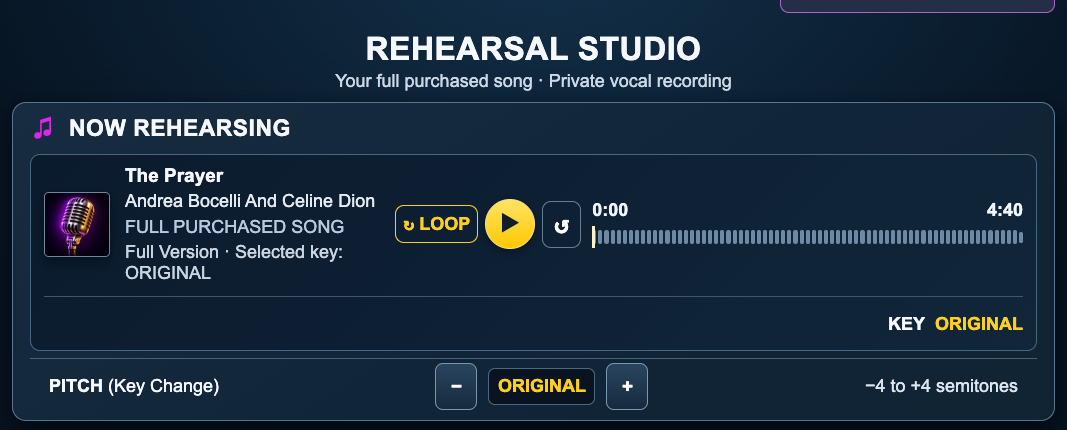
Load an eligible backing track from your Superbackings purchases, then rehearse with the full recording rather than a short preview. The player shows your track, version, key and playback position.
Play, restart and repeat the song with the loop control.
Transpose up or down by one-semitone steps, from −4 to +4.
Keep the original tempo when changing key.
Return to the original pitch whenever you want.
As with any pitch processing, the result can vary depending on the track and the amount of transposition.
NOW REHEARSING · PITCHACTUAL DESKTOP CONTROLS
Actual full-song player. Tap or click the image to see the original-size screenshot.
FEATURE 02 · VOCAL RECORDING
Record your own voice over the music.
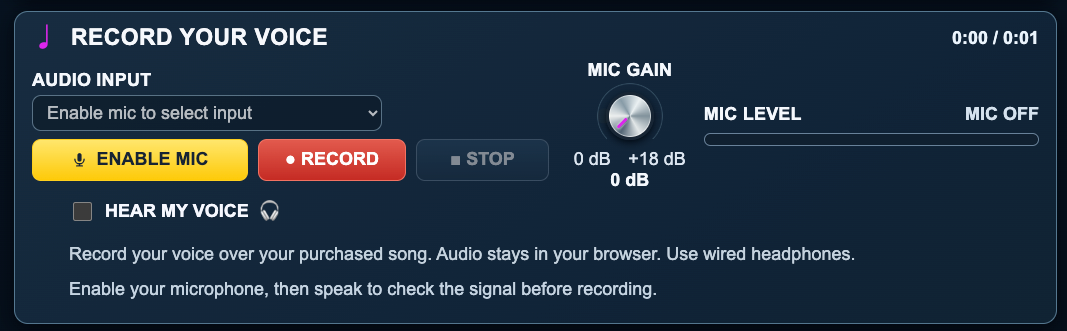
Connect a microphone, enable access in your browser and check the input level before recording. When you are ready, press Record and sing with the backing track.
Choose your audio input and adjust microphone gain.
Check the mic-level indicator before your take.
Record and stop directly from the studio.
Use wired headphones to reduce feedback and unwanted bleed.
Your voice is processed in the browser. Superbackings does not upload or store the vocal recording on its servers as part of this tool.
RECORD YOUR VOICEACTUAL DESKTOP CONTROLS
Actual recording panel with microphone selection, input gain and voice monitoring.
FEATURE 03 · VOCAL MIXING
Make the backing track and your voice work together.
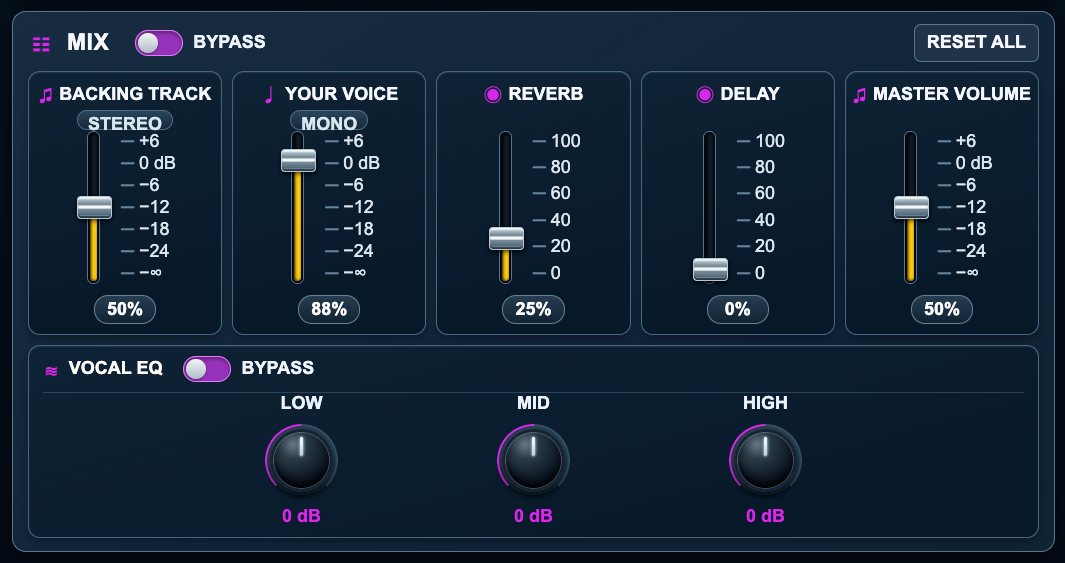
Once your take is recorded, use the mixer to shape the balance between the backing track and your voice. Add a little reverb or delay, and adjust the vocal EQ until your performance sounds right for you.
Independent backing-track and vocal-volume faders.
Reverb and delay amount controls.
Master output volume and reset controls.
Three-band vocal EQ: Low, Mid and High.
Bypass controls for quick comparisons.
EQ and effects modify your recorded mix; they do not isolate instruments or replace the original purchased audio.
MIX · VOCAL EQACTUAL DESKTOP CONTROLS
Actual five-fader mixer and three-band vocal EQ, with bypass and reset controls.
FEATURE 04 · EXPORT & MASTERING
Download your performance as WAV or MP3.
When you like your performance, export your recorded mix. Choose an uncompressed WAV for higher-quality local storage or a smaller MP3 that is easier to share or play back.
DOWNLOAD WAV — an uncompressed audio file.
DOWNLOAD MP3 — a smaller, portable audio file.
MASTER YOUR MIX IN AUDIO LAB — open a temporary session with your recorded mix for additional processing.
Rehearsal Studio does not keep a permanent copy of your voice. Download your recording before closing or refreshing the session.
Actual export controls. Download choices become available after recording.
♫
Want to refine your sound even further?
From Rehearsal Studio, you can send your recorded mix to Audio Lab to make a perfect master for your music. Learn more about Superbackings Audio Lab and its additional sound-processing options.
GOOD TO KNOW
Frequently asked questions
Is Rehearsal Studio free?
There is no additional charge for Rehearsal Studio with eligible full-length backing tracks purchased from Superbackings. To use the full-song studio, you need a customer account and an eligible purchased track.
Can I record vocals over an entire purchased song?
Yes the Rehearsal Studio works with eligible complete backing tracks from your purchases. Recording and processing still depend on your computer and browser capabilities.
Can I change the key without changing the tempo?
Yes. The pitch control lets you move from four semitones lower to four higher in one-semitone steps, while aiming to preserve the original tempo. The sound may vary depending on the original material and the amount of pitch shifting.
Does my voice get uploaded or saved by Superbackings?
No. The voice recording is processed in your browser and is not uploaded to or stored on our servers by Rehearsal Studio. You are responsible for downloading your take before you leave or refresh the studio.
What can I adjust in my vocal mix?
You can balance the backing track and voice, adjust master volume, add reverb and delay, and shape the recorded voice with three-band Low, Mid and High EQ. Controls include bypass and reset options.
Which audio formats can I download?
After recording, you can download your mix in WAV or MP3 format.
Can I use Rehearsal Studio on my phone?
The full-song recording studio is currently designed for desktop and laptop computers, not mobile phones. This informational page is mobile-friendly, but the studio screenshots show its desktop controls. Mobile studio support may be considered in the future and is not currently promised.
Do I need a microphone or special software?
You need a computer, a microphone, a compatible browser with microphone permission and an internet connection to load your eligible purchased song. No separate recording application needs to be installed. Wired headphones are recommended.
Will Rehearsal Studio change my purchased backing track?
No. Your original purchased track remains unchanged. Rehearsal Studio creates a separate recorded performance that you can export. Your purchase and its normal download rules remain separate from the recording session.
What happens when I close the studio?
Unsaved recorded takes and temporary mixes can be lost when you close, refresh or leave the session. Download the recording you want to keep before leaving.
YOUR MUSIC · YOUR VOICE
Ready to hear yourself in the song?
When you find the backing track you love, purchase the song and open it into the rehearsal studio from your Superbackings customer area to record your performance in Rehearsal Studio.